Automatic note saving.
Your notes save automatically in this browser as you type. Come back to the words you left behind.
Auto-save, built inPlain text editor. By Puter.
Write notes, drafts, and code in your browser. Auto-save keeps your work on this device. Use optional AI help or save cloud files inside Puter.
No sign-up. No ads. Free editor.

Simple on the surface. Useful all the way through.
A clean writing space, with the tools you reach for already within reach.
Your notes save automatically in this browser as you type. Come back to the words you left behind.
Auto-save, built inOpen a text file, drag one in, or save a note to your computer. In supported browsers, save changes straight back to the same file.
.txt .md .html and moreAsk the AI assistant to polish a paragraph, summarize a draft, or fix your spelling. Undo any AI edit just like your own.
Optional AI, powered by PuterFrom prose to programming
Switch to Code mode for syntax highlighting, line numbers, and bracket matching. JavaScript, Python, HTML, Markdown, and more feel right at home.
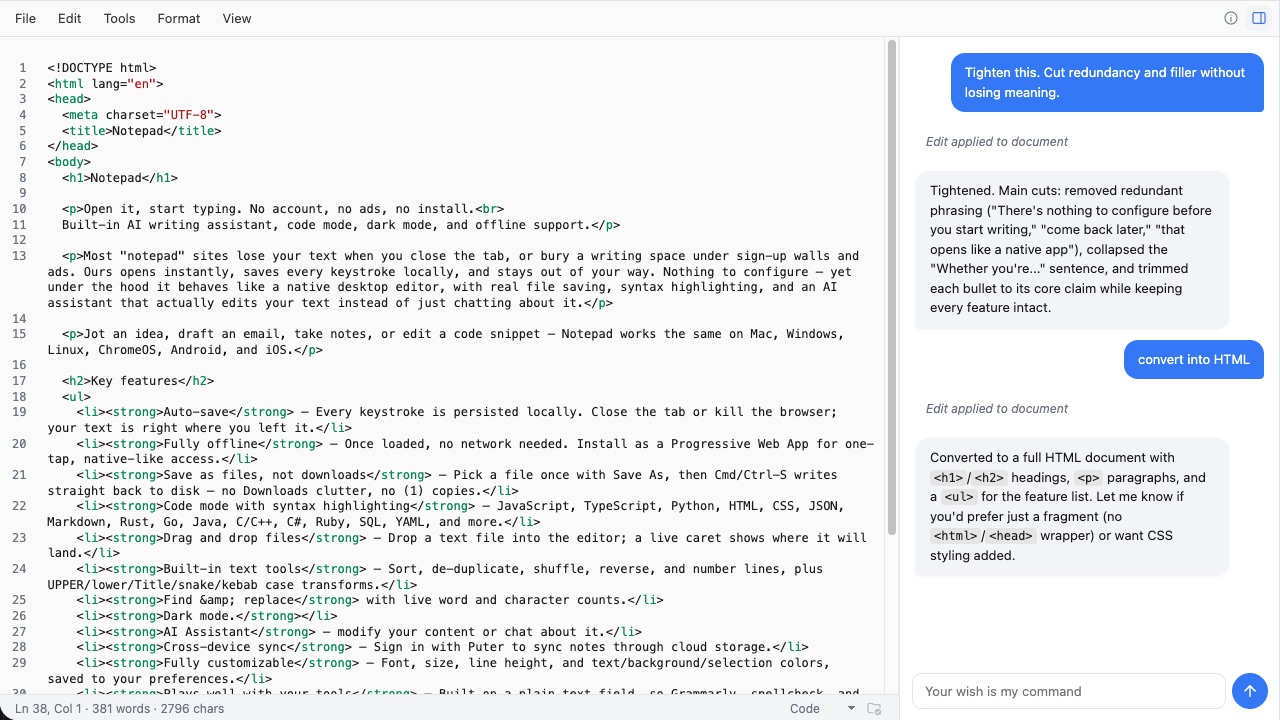
Follow your system’s light or dark mode, settle into sepia, or choose your own fonts and colors.
Find and replace, word counts, line sorting, and case changes. Less busywork between you and a finished thought.
Once the editor is cached, keep writing without a connection. Install it as a web app for a space that’s always close by. AI and cloud features need internet access.
Your notes start with you.
Auto-save keeps your notes in this browser. Ordinary editing doesn’t upload your document to a server.
Use the AI assistant when you want help, or open Notepad inside Puter to save files to your cloud drive.
Save important notes as files. Clearing this site’s browser data also clears its locally saved notes.
No setup to get in the way.
One click, right here in your browser. Nothing to download or sign up for.
Write a list, work on a draft, or drop in a file. Your note saves as you go.
Adjust your theme, ask for a little help, and save a copy whenever you’re ready.
A few good questions.
The text editor is free, with no ads or sign-up required. The optional AI assistant is powered by Puter; AI usage is subject to your Puter account’s limits.
Auto-save stores your notes on this device, in this browser. Your document is sent to Puter’s AI service when you use the AI assistant. Inside the Puter app, you can also choose to open and save files in your cloud drive.
Clearing this site’s data removes its locally saved notes. Save important work to a file on your computer or, inside Puter, to your cloud drive.
Once the editor and its resources are cached, you can write and edit offline. You can also install Notepad as a web app. AI assistance and Puter cloud features require an internet connection.
Save plain text (.txt), Markdown (.md), HTML (.html), or code source files. Supported browsers can save directly to a file you choose; other browsers download a copy.
Yes. Choose Code from the editor’s status bar to use syntax highlighting, line numbers, and bracket matching for languages including JavaScript, Python, HTML, CSS, JSON, and Markdown.
Yes. Notepad adapts to smaller screens and touch keyboards. The AI assistant opens as a bottom sheet on mobile.

Give it a little space.
Open your notepad Online Notepad
Take notes, write drafts, and jot down ideas right in your browser with Online Notepad. Complete with dark mode, an AI writing helper, and one-click save to your computer. No sign-up, no ads.
The text editor is free, with no ads or sign-up required. The optional AI assistant is powered by Puter; AI usage is subject to your Puter account’s limits.
Auto-save stores your notes on this device, in this browser. Your document is sent to Puter’s AI service when you use the AI assistant. Inside the Puter app, you can also choose to open and save files in your cloud drive.
Clearing this site’s data removes its locally saved notes. Save important work to a file on your computer or, inside Puter, to your cloud drive.
Once the editor and its resources are cached, you can write and edit offline. You can also install Notepad as a web app. AI assistance and Puter cloud features require an internet connection.
You can export and save your written notes directly to your local computer or device as plain text (.txt), Markdown (.md), HTML (.html), or code source files.
Yes. Choose Code from the editor’s status bar to use syntax highlighting, line numbers, and bracket matching for languages including JavaScript, Python, HTML, CSS, JSON, and Markdown.
Yes. Notepad adapts to smaller screens and touch keyboards. The AI assistant opens as a bottom sheet on mobile.
Unlike built-in desktop apps, this notepad runs in any browser without installation, auto-saves as you type, and includes an AI writing assistant, dark mode, find & replace, code syntax highlighting, and the option to open and save cloud files inside Puter.
Made by Puter.